
Characters
Create AI characters for your server, each with its own name, avatar, personality and @role, that members can chat with by mentioning them, replying, or posting in their own channel.
By the end, you'll have
- Your first AI character, from a template or from scratch
- Clear rules for where and how characters reply
- Limits that keep usage under control
Before you start
- Manage Server, which you need to create and edit characters.
- Dreamliner with Manage Webhooks (so characters post with their own name and avatar) and Manage Roles (for each character's @role).
Characters brings AI personalities to your server: a grumpy pirate, a cheerful helper, a mysterious narrator. Each one gets its own @role so members can call it, and replies with its own name and picture.
Name, avatar, personality, tone, catchphrases and more.
Mention its role, reply to it, say its name, or use its own channel.
Every character is reviewed, and replies are filtered before posting.
Step 1 · about 5 min
Create a character
Make your first character.
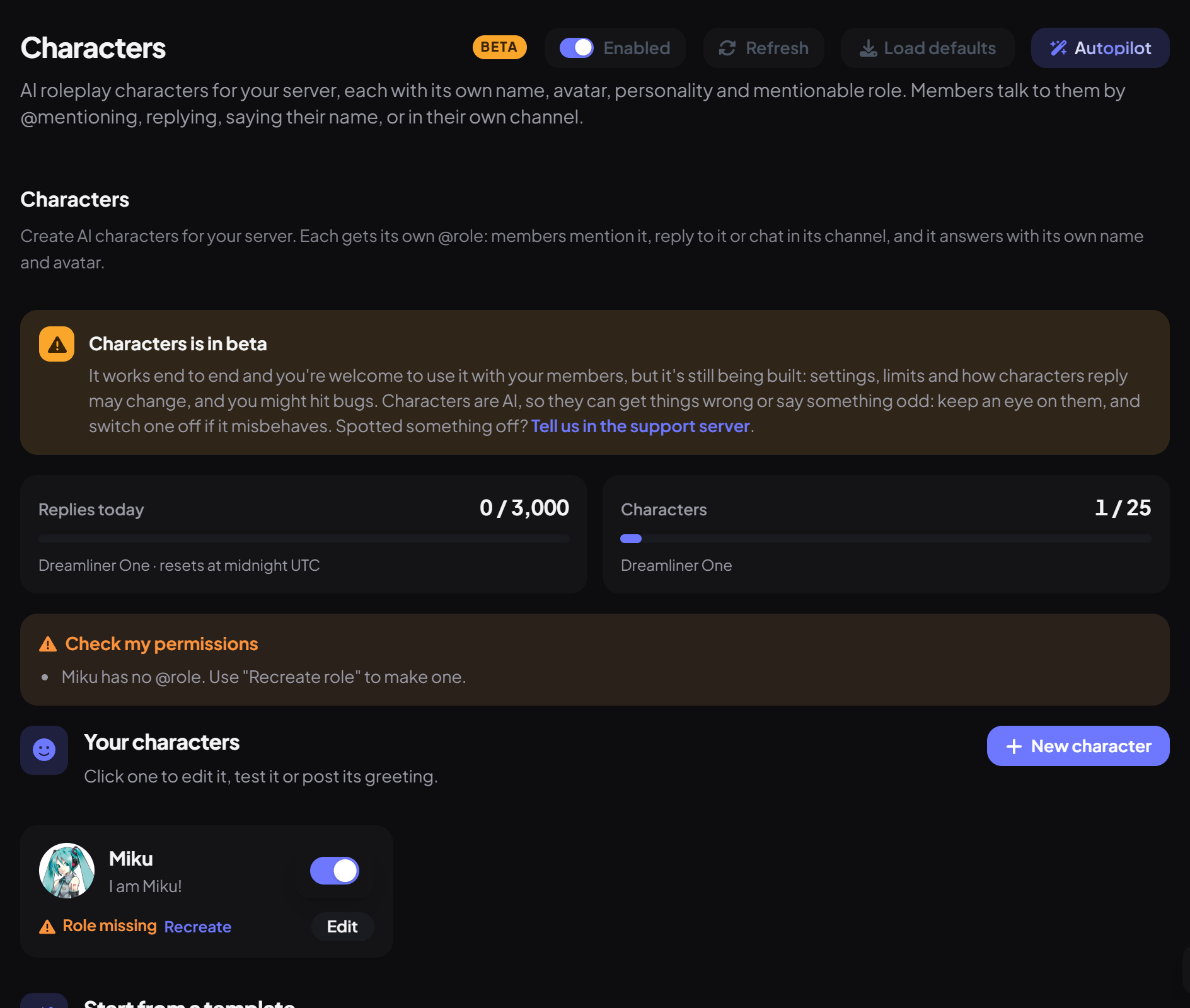
- On the dashboard, open Fun and click Characters.
- Pick a template under Start from a template (like Evil Dreamliner or Cozy Dreamliner), or press New character.
- Under Identity, set the Name, an Avatar (upload or link) and a Tagline.
- Under Personality, describe Who they are. This is the only required field. Add a Scenario, a Greeting and Example dialogue to bring them to life.
- Press Create character. Dreamliner checks it, saves it and creates its @role.
Step 2 · about 3 min
Shape how it talks
Give it a voice of its own.
| Setting | What it does | Default |
|---|---|---|
| Tone | One of 14 presets, like playful or dramatic, or none. | None |
| Emoji | None, Some or Lots. | Some |
| Formality | Casual, Balanced or Formal. | Balanced |
| Roleplay actions | Lets it use *actions* like *waves*. | On |
| Catchphrases | Up to 5 phrases it likes to use. | None |
| Reply style | Short, Medium or Long answers. | Medium |
| Creativity | From Steady to Wild. | Balanced |
Use the test chat beside the editor to try it out, and Post greeting to introduce it in a channel. Test chats count towards your daily replies.
Step 3 · about 2 min
Choose where characters reply
Keep characters in the right places.
Server-wide settings decide how members can start a conversation:
| Trigger | What it means | Default |
|---|---|---|
| @mention its role | Always on. | On |
| Reply to its messages | Replying to a character continues the chat. | On |
| Say its name | Saying the character's name in a message calls it. | Off |
| Dedicated channels | Every message in its own channels gets a reply (set up to 5 per character). | On |
| Setting | What it does | Default |
|---|---|---|
| Allowed / Blocked channels | Where characters may talk. Empty allowed means every channel Dreamliner can read. | Everywhere |
| Cooldown (seconds) | Time between replies to the same member, per character. | 5 |
| Replies per member a day | A daily cap per member. 0 is no limit. | No limit |
| Longest reply | Maximum reply length. | 1,200 characters |
Safety
- Names can't impersonate staff, Discord or Dreamliner itself ("Evil Dreamliner" is fine, "Dreamliner Support" isn't).
- Every character is reviewed when saved. One that breaks the rules is saved switched off with "Needs changes".
- Replies are cleaned before posting: no pings, swearing censored, and anything hateful dropped.
- The Character rules box on the page lists exactly what's allowed.
Limits and commands
| Command | What it does | Who |
|---|---|---|
/characters list | Shows every character and how to talk to it. | Everyone |
/characters reset | Makes a character forget the conversation in this channel. | Manage Messages or Manage Server |
You're set up
What you just did
- Created a character and shaped its voice
- Chose how and where characters reply
- Learned the safety rules and limits
Common questions
My character replies as Dreamliner instead of itself.
Dreamliner needs Manage Webhooks to post with the character's name and avatar. Without it, replying to a character doesn't continue the chat either.
Mentioning the character does nothing.
Check the character is switched on and its role still exists (use Recreate role), and that the channel isn't blocked or age-restricted.
Read next