
Birthdays
Celebrate every member's birthday automatically: an announcement with a Wish button, a birthday role for the day, an optional DM, all at the right time in each member's own timezone.
By the end, you'll have
- Members setting their birthday once with /birthday set
- A birthday announcement with a Wish button, reactions or a thread
- A birthday role and an optional DM, at midnight in each member's timezone
Before you start
- An announcement channel where Dreamliner can send messages.
- For a birthday role: the role created in Discord, below Dreamliner's role, and Dreamliner with Manage Roles.
- Manage Server, so you can open the dashboard.
Birthdays makes members feel remembered. Each member sets their birthday once, and every server they share with Dreamliner can celebrate it its own way. It's completely free.
A birthday follows the member to every server, and each server celebrates its own way.
Announcement, Wish button, reactions, a thread, a role and a DM.
At midnight in the member's own timezone, or your server's.
Step 1 · about 3 min
Turn on the announcement
Post a birthday message in a channel.
- On the dashboard, open Fun and click Birthdays.
- Under Birthday announcement, pick the Channel. Without one, nothing is posted.
- Optionally add roles to Also ping (up to 5). Ping the birthday member is on by default.
- Edit the message: text, an embed or an image card. The default is "Happy birthday {user}! Have an amazing day."
- Press Send test announcement, then Save.
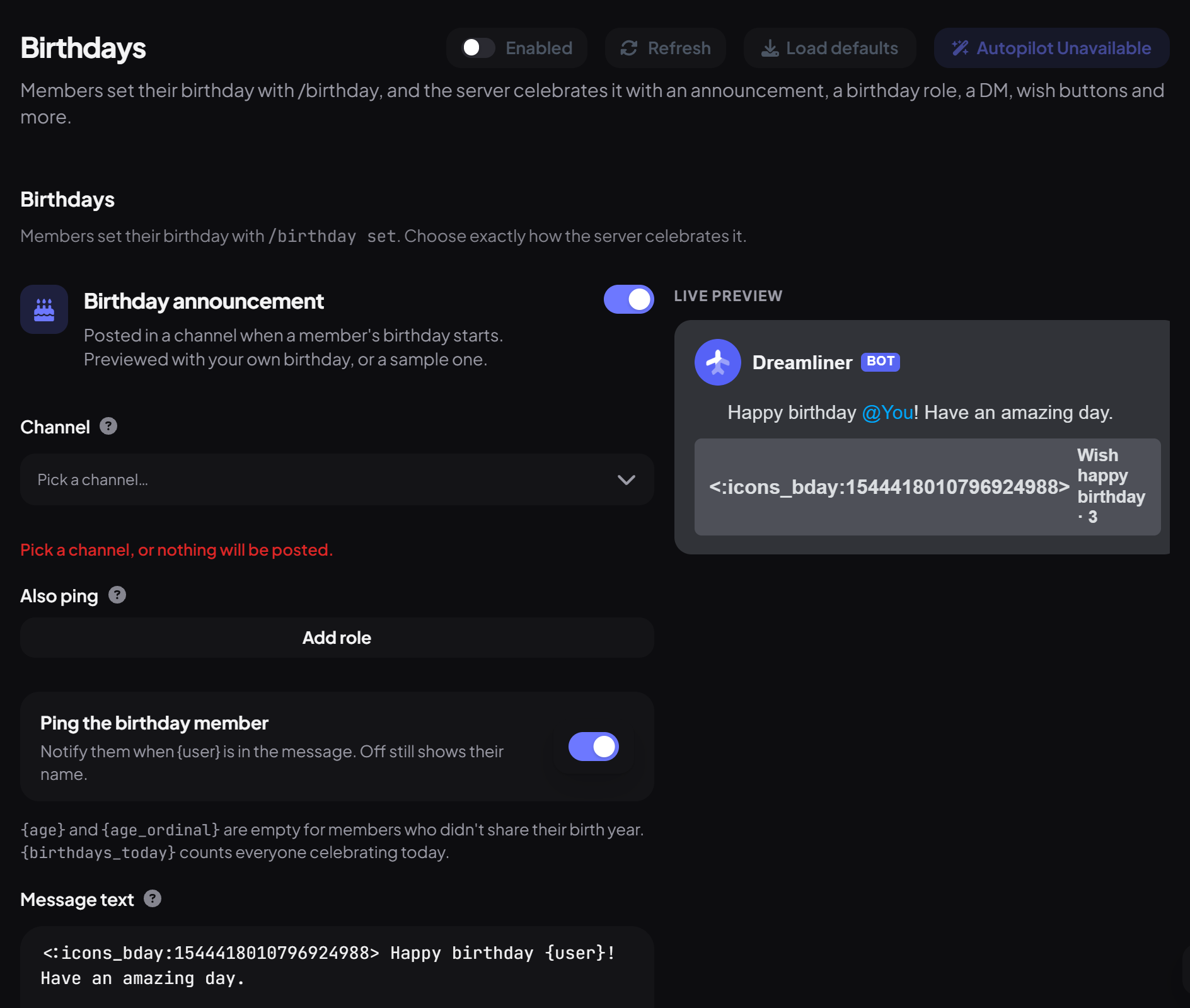
Birthday placeholders
| Placeholder | Becomes |
|---|---|
| {user} / {user_display} | A mention of the member / their name |
| {age} / {age_ordinal} | Their age, like 21 / 21st (empty without a birth year or with Show ages off) |
| {birthday} | Their birthday, like 14 March |
| {birthdays_today} | Everyone celebrating today |
| {guild} | Your server's name |
Step 2 · about 3 min
Make it a party (optional)
Add buttons, reactions and a thread.
| Extra | What it does | Default |
|---|---|---|
| Wish button | Members press it to wish happy birthday, once each. Show the tally adds a count, like "Wish happy birthday · 12". | On |
| Link buttons | Up to 4 buttons with a label and an https link. | None |
| Reactions | Up to 5 emoji added to the announcement. | None |
| Birthday thread | Opens a thread on the announcement for wishes (name and archive time are up to you). | Off |
| Delete the announcement later | Removes it after 1 to 168 hours. | Off |
Step 3 · about 2 min
Add a birthday role and DM (optional)
Give the birthday member something special.
Step 4 · about 2 min
Choose when and who
Set timezones and who gets celebrated.
| Setting | What it does | Default |
|---|---|---|
| Whose clock | Each member's timezone, or your server timezone for everyone. | Each member's timezone |
| Server timezone | Used for everyone in server mode, and for members who never gave a timezone. | UTC |
| Celebrate at | The local time celebrations start. | 00:00 |
| 29 February birthdays | Celebrated on 28 February or 1 March in other years. | 28 February |
| Only these roles / Never these roles | Limit who is celebrated. | Everyone |
| Show ages | Allows {age} in messages. | On |
| Require a birth year | Members must give a year when setting a birthday. | Off |
Upcoming birthdays at the bottom shows how many birthdays are set and who's next.
What members do
| Command | What it does | Who by default |
|---|---|---|
/birthday set | Set your birthday: month, day, and optionally year and timezone (like Europe/London or GMT+2). | Everyone |
/birthday remove | Remove your birthday everywhere. | Everyone |
/birthday privacy | Opt out of being celebrated in this server only. | Everyone |
/birthday view · upcoming | See someone's birthday, or the next 10. | Everyone |
/birthday manage set · remove | Staff: set a birthday for a member in this server only. | Moderator |
- A birthday set with /birthday manage only applies in your server, and overrides the member's own there.
- If Dreamliner was offline at the start time, the celebration still happens later that day.
You're set up
What you just did
- Turned on the announcement in a channel
- Added extras, a role or a DM
- Chose timezones and who's celebrated
Tell members to run /birthday set: a pinned message or a tag works well.
Common questions
Nobody was celebrated.
Check the announcement has a channel (or the role or DM is on), the member set their birthday, and they haven't opted out here.
The birthday role wasn't given.
It must be below Dreamliner's highest role and can't have staff permissions like Administrator or Manage Roles.
Read next