
Appeals
Give punished members a fair way to ask for a second look: a branded appeal page, your own questions, a review queue in Discord and on the dashboard, and one-click unbans when you approve.
By the end, you'll have
- A public appeal page for your server that punished members sign in to, with the questions you want answered
- Appeals arriving in a staff channel and on the dashboard, with Approve, Deny and Needs info in one click
- Approved appeals lifting the ban or timeout automatically, and the member told the outcome
Before you start
- Infractions set up, since appeals are made against its cases. See the Infractions guide.
- A private staff channel for appeals to arrive in.
- Manage Server, so you can open the dashboard.
Mistakes happen, and people change. Appeals turns "DM a mod and hope" into a proper process: the member explains themselves on a clean page, your team reviews it together, and the decision (and the unban) happens in one place. Everything is free.
Banned members can still reach it: they sign in with Discord on the website, not in your server.
Appeals post to your staff channel and the dashboard's View Appeals page.
Approving can unban, remove a timeout or revoke the case straight away.
How an appeal works, start to finish
- A member is punished with Infractions or Automod. Their DM includes an Appeal button. For kicks and bans, that DM is sent before they're removed, so it still reaches them.
- The button opens your server's appeal page. They sign in with Discord, see the cases on file for them and pick one.
- They answer your questions and submit. A status page lets them follow it, answer staff questions or withdraw it.
- Your team reviews it in Discord or on the dashboard: Approve, Deny or ask a question with Needs info.
- Dreamliner DMs them the decision, lifts the punishment if you approved, and can send an invite back if they were unbanned.
Step 1 · about 1 min
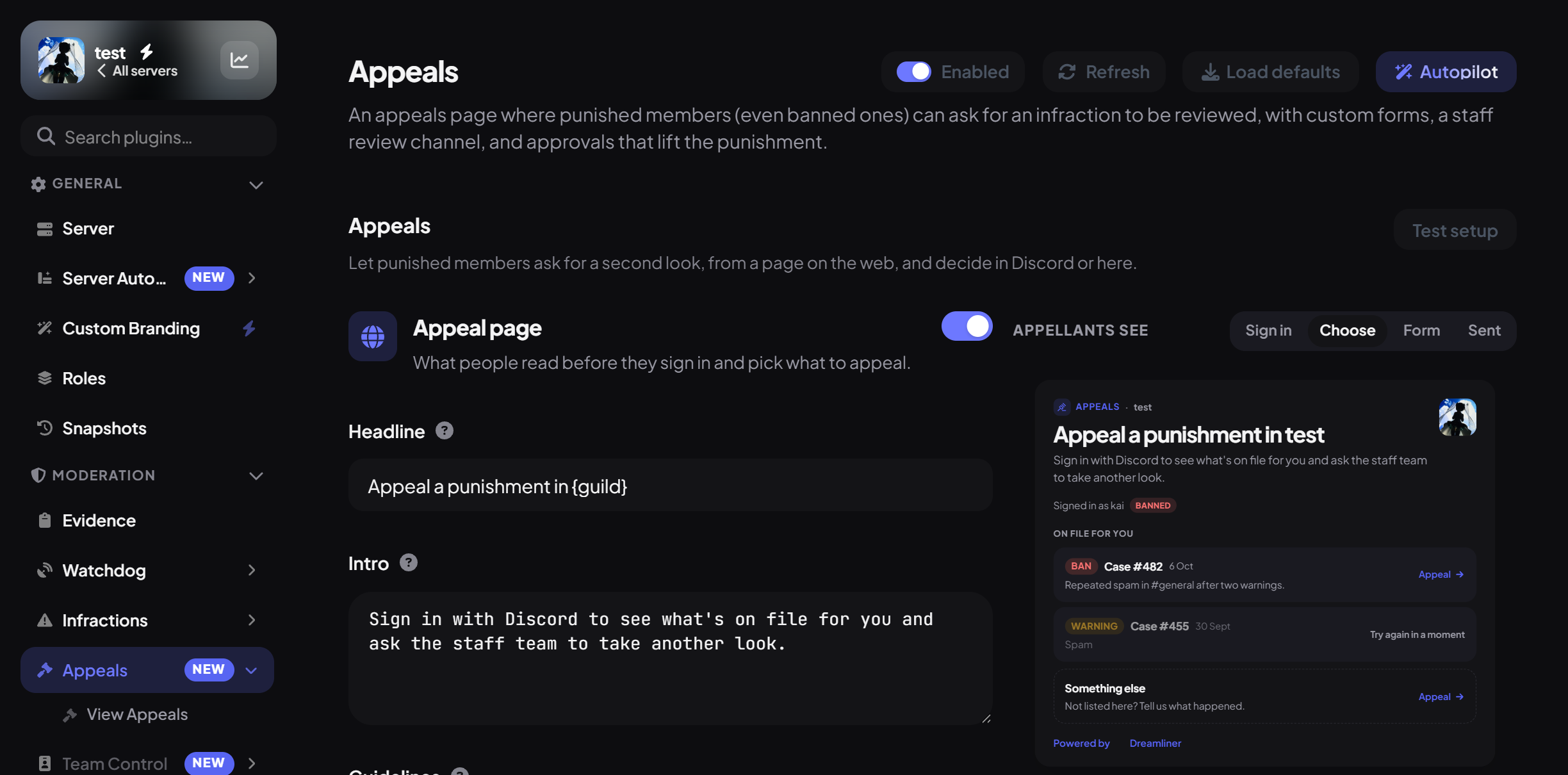
Turn Appeals on and open it
Enable the plugin and find its pages.
- In the dashboard sidebar, open Moderation and click Appeals.
- Switch on Enabled at the top and press Save.
- Notice View Appeals under Appeals in the sidebar. That's your review queue (step 7).
Step 2 · about 2 min
Choose where appeals arrive
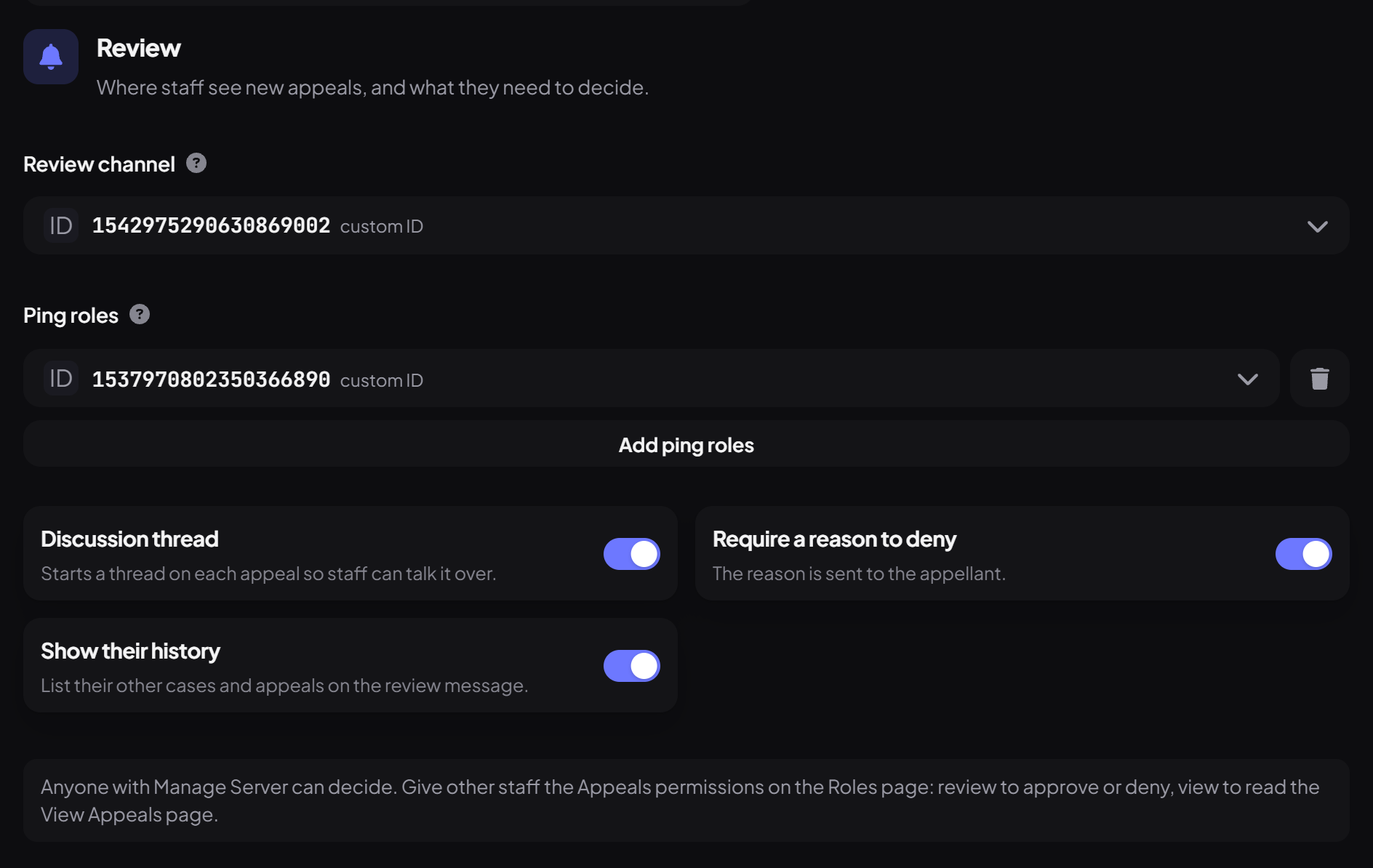
Pick a staff channel and who gets pinged.
In the Review section:
| Setting | What it does | Default |
|---|---|---|
| Review channel | Each new appeal is posted here with Approve, Deny, Needs info and Note buttons. | None (dashboard only) |
| Ping roles | Roles mentioned when an appeal arrives (up to 10). | None |
| Discussion thread | Opens a thread on each appeal for your team to talk it through. | On |
| Require a reason to deny | Denying needs a reason, which is sent to the member. | On |
| Show their history | Adds the member's other cases to the review post. | On |
Step 3 · about 3 min
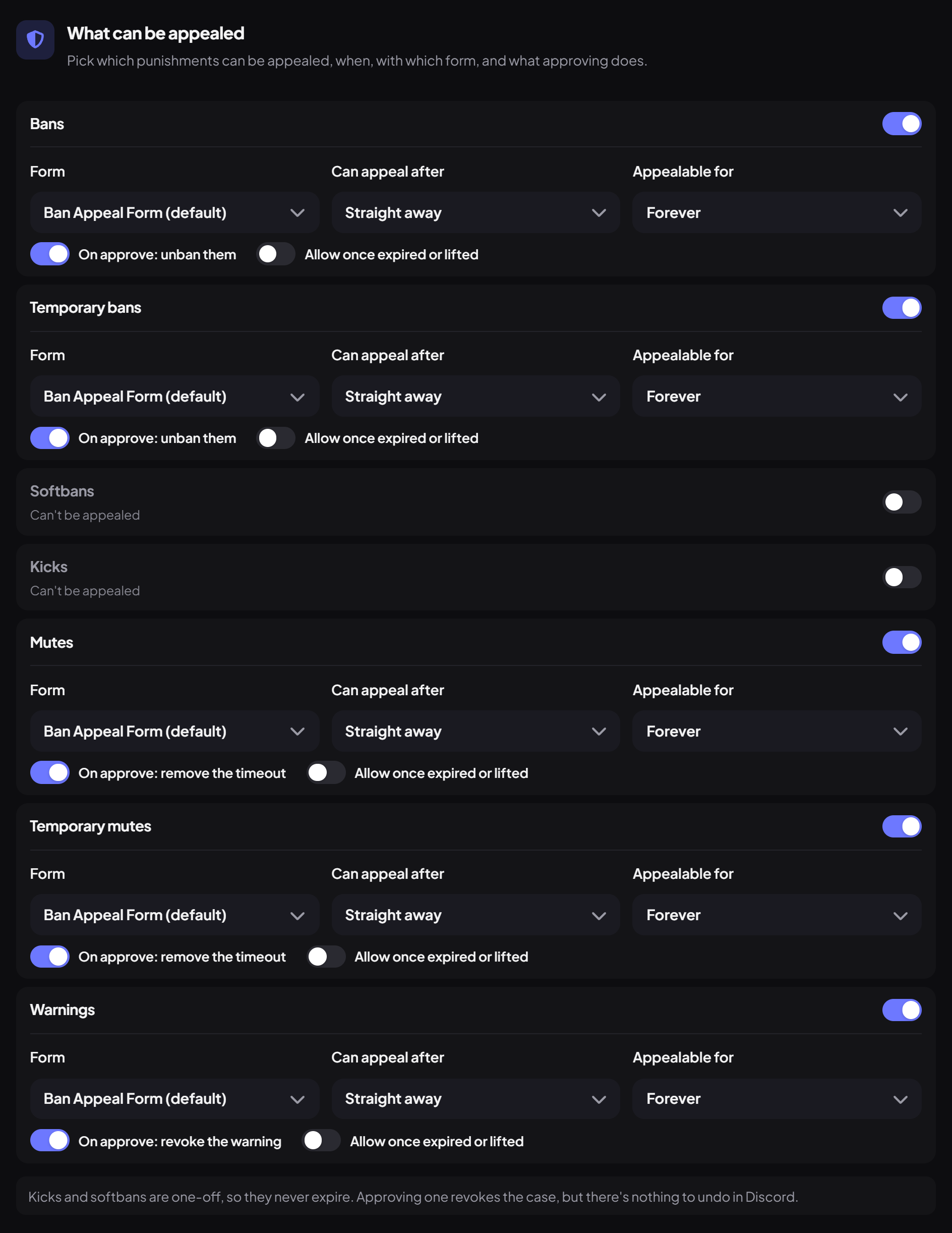
Choose what can be appealed
Decide which punishments are appealable, when and for how long.
Under What can be appealed there's a row per punishment type. Bans, tempbans, mutes, tempmutes and warnings are appealable by default; kicks and softbans aren't. Staff notes can never be appealed. For each type you can set:
| Setting | What it does |
|---|---|
| Form | Which question form they fill in (step 5). |
| Can appeal after | A waiting period before they can appeal: straight away, or from 1 hour up to 30 days. |
| Appealable for | How long after the punishment they can appeal: forever, or from 1 week up to 1 year. |
| On approve | Whether approving lifts the punishment by default (unban, end the timeout, or revoke the case). |
| Allow once expired or lifted | Lets them appeal a punishment that has already ended, for example to clear their record. |
Step 4 · about 3 min
Write your appeal questions
Ask what you need to make a fair decision.
Under Appeal forms, the Default form already asks three good questions: "What happened?", "Why should we lift it?" and "Anything else we should know?". Adjust them or press New form for a different set, such as one for bans and a shorter one for warnings.
- Up to 10 forms, each with up to 20 questions.
- Question types: short text, paragraph, dropdown, radio buttons, checkboxes, a single checkbox, or a plain text block for instructions.
- Set minimum and maximum lengths so answers are thoughtful, not "pls unban".
- Give each form an intro, and the page some guidelines under "Before you start", written in Markdown.
Step 5 · about 2 min
Make the appeal page yours
Brand the page and decide what members see.
The Appeal page, Look and privacy and Result screens sections control what members see:
| Setting | What it does | Default |
|---|---|---|
| Headline, intro and guidelines | The page's title and the text above the form. | "Appeal a punishment in {guild}" |
| Use the server accent color | Matches your server's colour, or pick your own accent. | On |
| Background | None, a solid colour, an image link, an uploaded image or your server banner. | None |
| Case reasons | Shows the reason on each case they can appeal. | On |
| Moderator names | Shows who punished them and who reviewed. Off shows "Staff team". | Off |
| Link from the server page | Adds "Appeal a punishment" to your public server page. | On |
| Result screens | The message after submitting, and the one shown when appeals are closed. | "Appeal sent" |
Your page lives at dreamliner.site/server/your-server-id/appeals. The Setup checklist has a copy button and an Open button for it.
Step 6 · about 2 min
Set up decisions and DMs
Choose what members are told, and whether they're invited back.
In Decisions and DMs you can reword the Approved, Denied and Needs info messages, using placeholders like {guild}, {case} and {reason}. Each DM has a View appeal button back to their status page.
Step 7 · about 1 min
Set limits to prevent spam
Stop the same person appealing over and over.
| Setting | What it does | Default |
|---|---|---|
| Appeals per case | How many times one case can be appealed. | 2 |
| Open at once | How many undecided appeals one person can have. | 1 |
| After a denial | How long they wait before appealing the same case again. | 30 days |
| Minimum account age | Blocks brand-new accounts from appealing. | None |
| Blocked users and roles | People who can never appeal. | None |
Step 8 · about 2 min
Review appeals
Approve, deny or ask a question, in Discord or on the dashboard.
In your review channel, each appeal shows the case, their answers, their history and its status, with these buttons:
| Button | What happens |
|---|---|
| Approve | Add an optional note for them, and keep Lift the punishment ticked to unban, end the timeout or revoke the case. |
| Deny | Write a reason, which is sent to them. |
| Needs info | Ask them a question. Their reply comes back here and the appeal returns to the queue. |
| Note | A private note for your team. They never see it. |
On the dashboard, AppealsView Appeals has the same actions, plus tabs for Pending, Needs info, Approved and Denied, search, and stats like approval rate and time to decision.
Step 9 · about 2 min
Check access and test it
Make sure your team can review, then run a test appeal.
Two permissions control appeals on the Roles page: Review (approve, deny, ask) and View (see appeals on the dashboard). Moderator has both by default; tick them on any other team that reviews appeals.
- Press Test setup at the top of the Appeals page, or Run checks under Health check. It checks the review channel, threads, and whether Dreamliner can unban, remove timeouts and invite people back.
- Warn a test account. Its DM has an Appeal button.
- Appeal from the test account, then approve it in your review channel and watch the warning get revoked.
You're set up
What you just did
- Turned Appeals on with a private review channel
- Chose what can be appealed and wrote fair, specific questions
- Branded the page, set the DMs and limits, and tested a full appeal
Want to know how your team is handling appeals and other work? Team Control tracks staff activity, shifts and more.
Common questions
Can someone who's banned actually reach the page?
Yes. The page is on the Dreamliner website, not in your server. They sign in with Discord there, so being banned doesn't stop them.
A member says they have nothing to appeal.
The page only lists cases of types you made appealable. Check What can be appealed, the Appealable for window, and whether the punishment already ended (turn on Allow once expired or lifted to allow those). For older bans, turn on Manual appeals.
Approving didn't unban them.
Check that Lift the punishment was ticked, that the reviewer can unban, and that Dreamliner has Ban Members. The review post says what was lifted.
Can they see our staff notes?
Never. Notes and the discussion thread are staff-only. They only see what you send them: questions, the decision and its reason.
Is Appeals free?
Yes, completely. There are no Dreamliner One limits on appeals.
Read next