
Suggestions
Collect ideas from your community with /suggest: review them first or post them straight away, let members vote and discuss, and mark progress as you go.
By the end, you'll have
- Members submitting ideas with /suggest
- A review queue (or instant posting), with votes and discussion threads
- Statuses like In progress and Implemented, with members kept in the loop
Before you start
- A suggestions channel, and a staff review channel if you review first.
- Dreamliner with Send Messages, Attach Files and Read Message History there (Create Public Threads for threads).
- Manage Server, so you can open the dashboard.
Suggestions gives ideas a home. Members submit them in a short form, your team approves the good ones, and everyone votes. Authors and followers are told when things change. It's free.
Approve ideas first, or post them straight away.
Upvote, neutral and downvote buttons with counts.
Optional threads and comments on each idea.
Step 1 · about 3 min
Set up channels and mode
Choose where suggestions go.
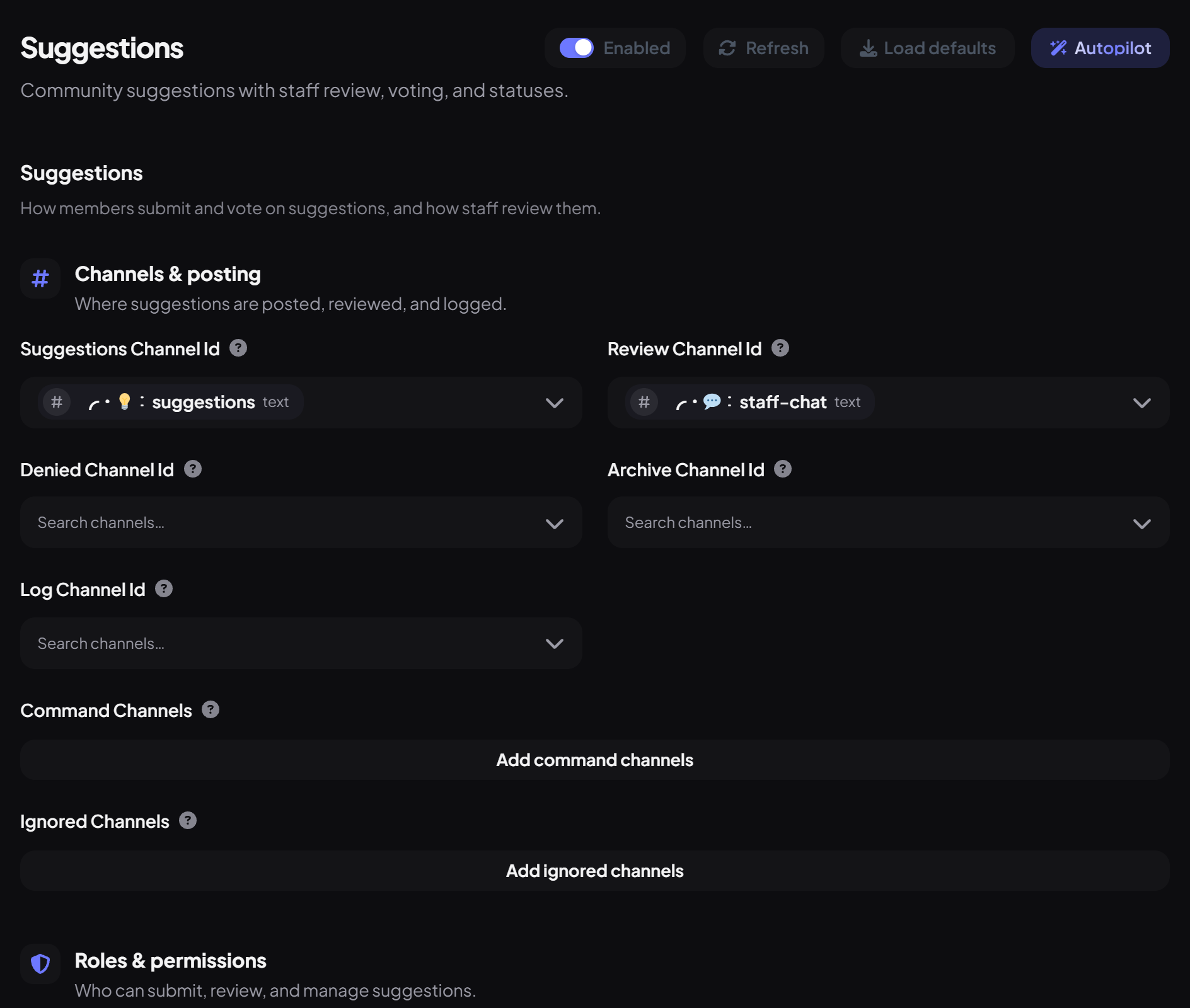
- On the dashboard, open Support and click Suggestions. Switch on Enabled.
- Under Channels & posting, set the Suggestions Channel (the public feed) and the Review Channel (staff only).
- Optionally set a Denied Channel and an Archive Channel for implemented ideas.
- Under Other settings, choose the Mode: review (staff approve first, the default) or autoapprove.
- Press Save.
Step 2 · about 3 min
Tune voting and limits
Decide how votes and submissions work.
| Setting | What it does | Default |
|---|---|---|
| Vote labels and emoji | Upvote, Neutral and Downvote buttons. | 👍 😐 👎 |
| Mid Vote Enabled | Shows the neutral button. | On |
| Allow Self Vote | Lets authors vote on their own ideas. | Off |
| Show Vote Count / Public Votes | Shows totals / lets anyone see who voted. | On / Off |
| Auto Thread | Opens a discussion thread on each suggestion. | Off |
| Cooldown / Max Open | Time between suggestions / most open suggestions per member. | 1 hour / 5 |
| Min Account Age / Member Age / Messages | Stops brand-new accounts suggesting. | 7 days / 1 day / 25 |
| Anonymous / Allow Attachments | Allow anonymous suggestions / an image. | Off / On |
| Approved Role / Implemented Role | Roles given to authors. | None |
How it works
- A member runs /suggest and writes their idea, with an optional image.
- In review mode, it goes to your review channel with Approve and Deny buttons.
- Approved ideas appear in the feed with vote buttons; the author and followers get a DM.
- Staff mark progress: In consideration, In progress, Implemented or Not happening. Implemented ideas are copied to the archive.
- Manage everything in View Suggestions on the dashboard too.
Commands
| Command | What it does | Who by default |
|---|---|---|
/suggest | Submit an idea. | Everyone |
/suggestion info · top · search | Look up ideas and the most popular ones. | Everyone |
/suggestion follow · comment | Follow updates or comment. | Everyone |
/suggestion approve · deny · silentdeny · dupe | Review ideas. | Moderator |
/suggestion mark | Set progress. | Moderator |
/suggestion block · unblock | Stop someone suggesting. | Moderator |
/suggestion queue · massapprove · massdeny | Work through the queue. | Moderator |
You're set up
What you just did
- Set channels and mode
- Tuned voting and limits
- Learned the review flow and commands
Common questions
Approved suggestions don't appear.
Make sure the Suggestions Channel is set and Dreamliner can post there.
Can staff see who sent an anonymous suggestion?
Yes, with /suggestion info or on the dashboard. Members can't.
Read next