
Passport (verification)
Hold new members behind a role until they verify on a short web page with a captcha, so bots and throwaway accounts can't flood your server the moment they join.
By the end, you'll have
- New members held behind an unverified role that only sees your verify channel
- A branded verification page with a captcha, plus roles granted the moment they pass
- Optional account-age limits, alt detection and kicks for people who never verify
Before you start
- A verify channel, an Unverified role and the role(s) members get once verified, created in Discord.
- Dreamliner with Manage Roles, its role above every Passport role.
- Manage Server, so you can open the dashboard.
Passport is a front door. Newcomers land in one channel with a Verify button, sign in with Discord on a short web page, solve a quick picture captcha and get let in. It stops bot accounts and mass raids cold, and it's free.
An Unverified role keeps newcomers in your verify channel.
Sign in with Discord, pick the matching pictures, done.
Their roles are granted the moment they pass.
What a new member experiences
- They join and get your Unverified role, so they can only see the verify channel.
- Dreamliner pings them there with a short message and a Verify button (and can DM it too).
- The button opens your server's Passport page. They press Continue with Discord, tick "I'm not a robot" and pick every picture that matches the prompt, like "Select every plane".
- They're verified: the Unverified role comes off, their member roles go on, and the ping is cleaned up.
Step 1 · about 3 min
Prepare your channels and roles in Discord
Make sure unverified members can only see the verify channel.
Passport never changes your channels, so this part happens in Discord:
- Create a role called something like "Unverified", and a verify channel.
- In the verify channel, allow the Unverified role to View Channel and read messages.
- Everywhere else, deny the Unverified role View Channel. Category permissions make this quick.
- Put Dreamliner's role above the Unverified role and your member roles in Server SettingsRoles.
Step 2 · about 1 min
Open Passport and turn it on
Find Passport and get to know its sub-pages.
- On the dashboard, open Moderation and click Passport. This opens its Overview.
- Switch on Enabled at the top and press Save changes in the bar at the bottom.
- The settings live in the sub-pages under it in the sidebar: Verification, Security, Join messages, Page & look and Test, plus the Alts list.
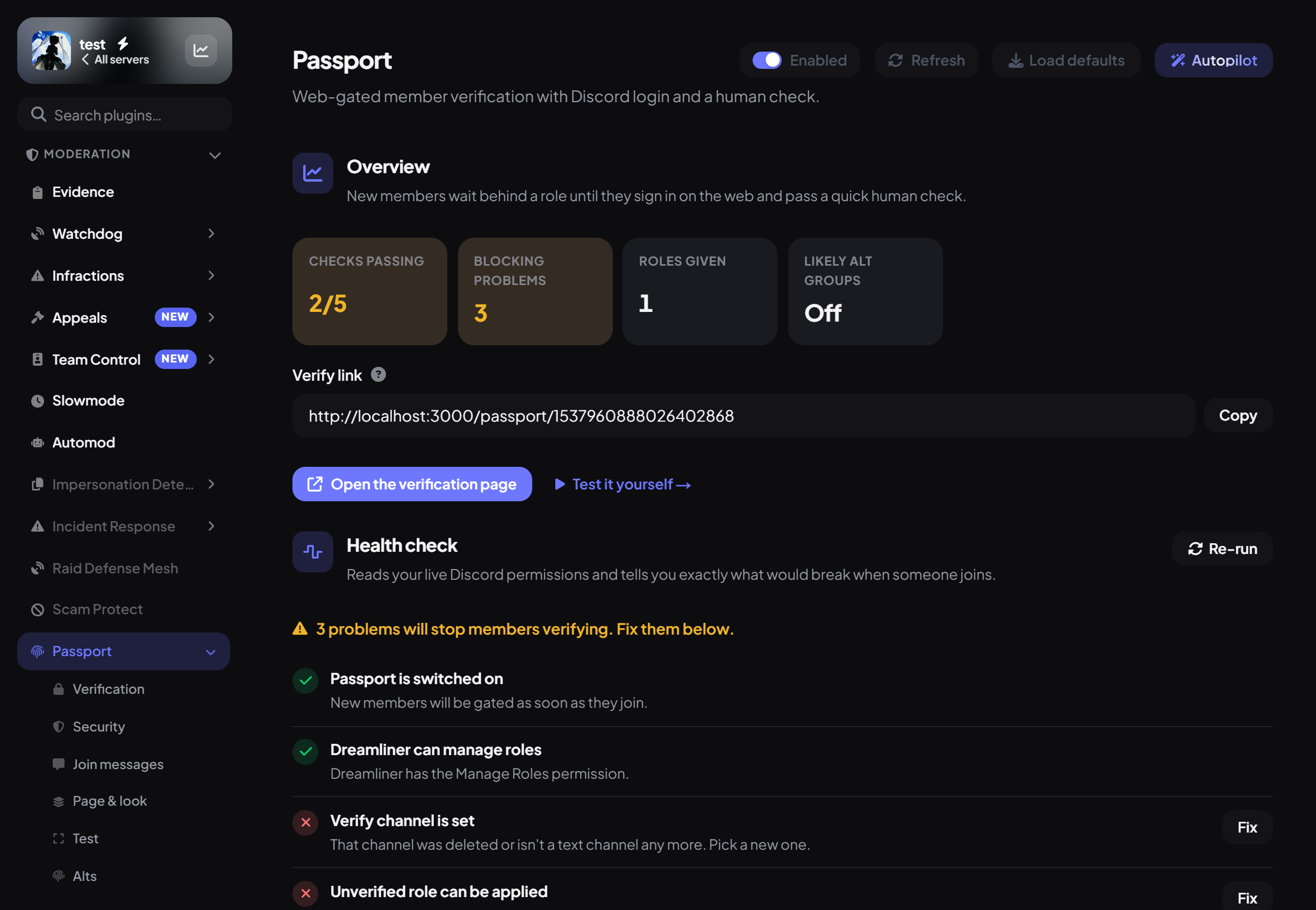
The Overview shows Checks passing, Blocking problems, Roles given and Likely alt groups, your Verify link with a Copy button, Open the verification page, and How it's set up, a summary of every setting. Its Health check runs by itself when you open the page (more on that in the last step).
Step 3 · about 2 min
Pick the channel and roles
Connect Passport to your channel and roles.
- Open the Verification sub-page.
- Under Channel and roles, choose the Verify channel, the Unverified role (applied on join) and the Roles granted on verify.
- Press Save changes.
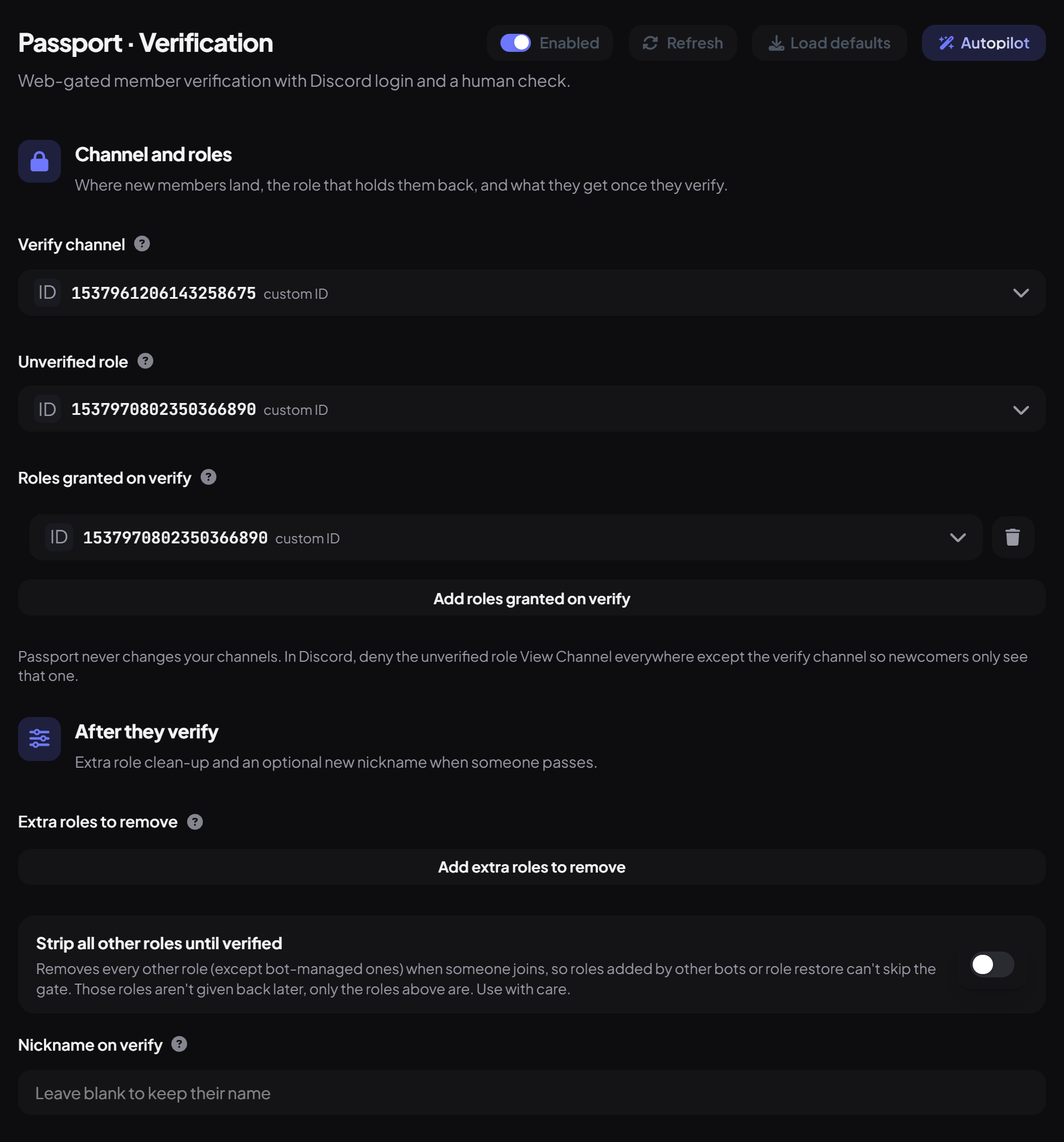
Under After they verify:
| Setting | What it does | Default |
|---|---|---|
| Extra roles to remove | More roles taken off when they verify. The Unverified role is always removed. | None |
| Strip all other roles until verified | Removes every other role (except bot-managed ones) when someone joins, so roles added by other bots can't skip the gate. Those roles aren't given back later. Use with care. | Off |
| Nickname on verify | Renames them when they pass, using placeholders like {user_display}. Leave blank to keep their name. | Blank |
Step 4 · about 2 min
Write the join ping and the panel
Tell newcomers what to do.
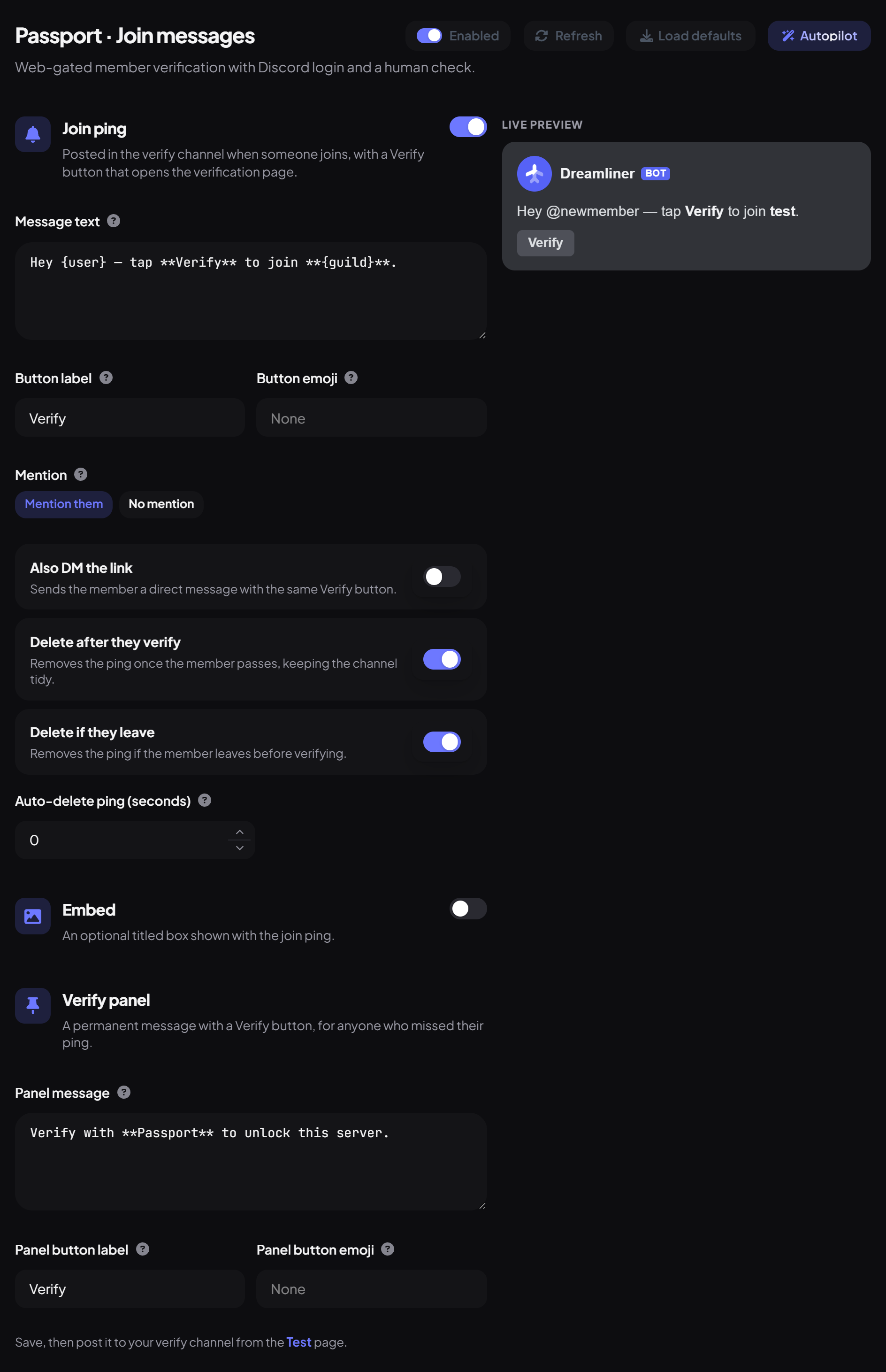
Open the Join messages sub-page. The Live preview on the right shows the ping as you type.
| Setting | What it does | Default |
|---|---|---|
| Join ping | Posted in the verify channel when someone joins, with a Verify button. | On |
| Message text | What the ping says. {user} mentions them and {guild} is your server's name. | Hey {user}, welcome to {guild}. Tap Verify to unlock the rest of the server. |
| Button label / Button emoji | The text and emoji on the button. | Verify / None |
| Mention | Mention them, or No mention. | Mention them |
| Also DM the link | Sends the same Verify button by DM. | Off |
| Delete after they verify / Delete if they leave | Keeps the channel tidy. | On / On |
| Auto-delete ping (seconds) | Deletes the ping after this long. 0 keeps it until they verify or leave. | 0 |
| Embed | An optional titled box with a Title, Description and Colour. | Off |
The Verify panel is a permanent message with a Verify button, for anyone who missed their ping. Set its Panel message and button, save, then post it from the Test sub-page with Post the verify panel.
Step 5 · about 2 min
Brand the verification page
Make the page look like your server.
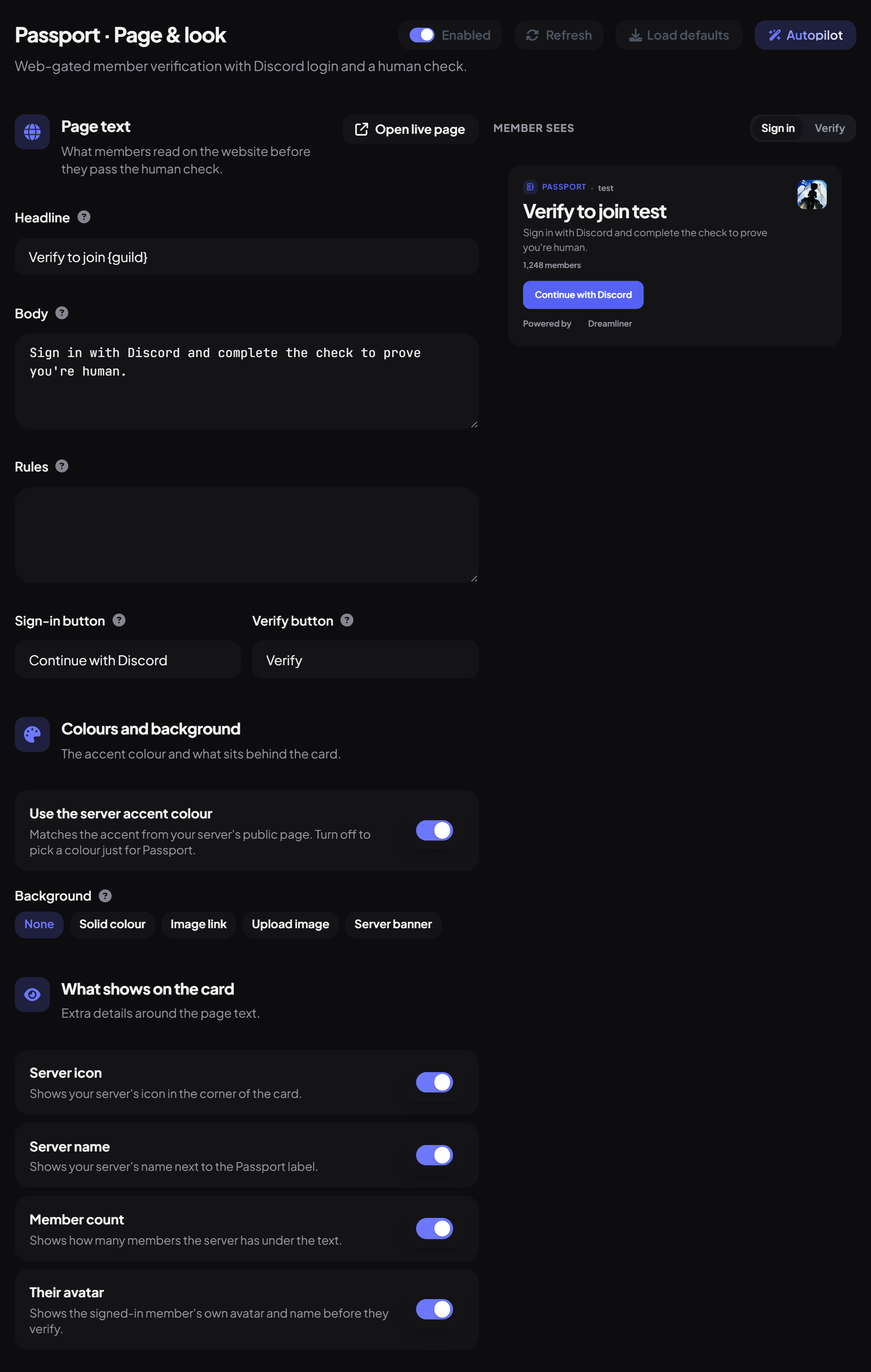
Open the Page & look sub-page. The Member sees preview on the right switches between Sign in and Verify, and Open live page opens the real thing.
| Panel | What you set |
|---|---|
| Page text | Headline, Body, Rules (optional), and the Sign-in button and Verify button labels. |
| Colours and background | Use the server accent colour, or pick an Accent. Background: None, Solid colour, Image link, Upload image (PNG, JPEG or WebP up to 4MB) or Server banner. |
| What shows on the card | Server icon, Server name, Member count and Their avatar. |
| Result screens | The title and message for After they verify, Already verified, Not a member and Passport off. |
The page lives at dreamliner.site/passport/your-server-id; copy it from Verify link on the Overview.
Step 6 · about 1 min
Decide who has to verify
Set account-age limits and exceptions.
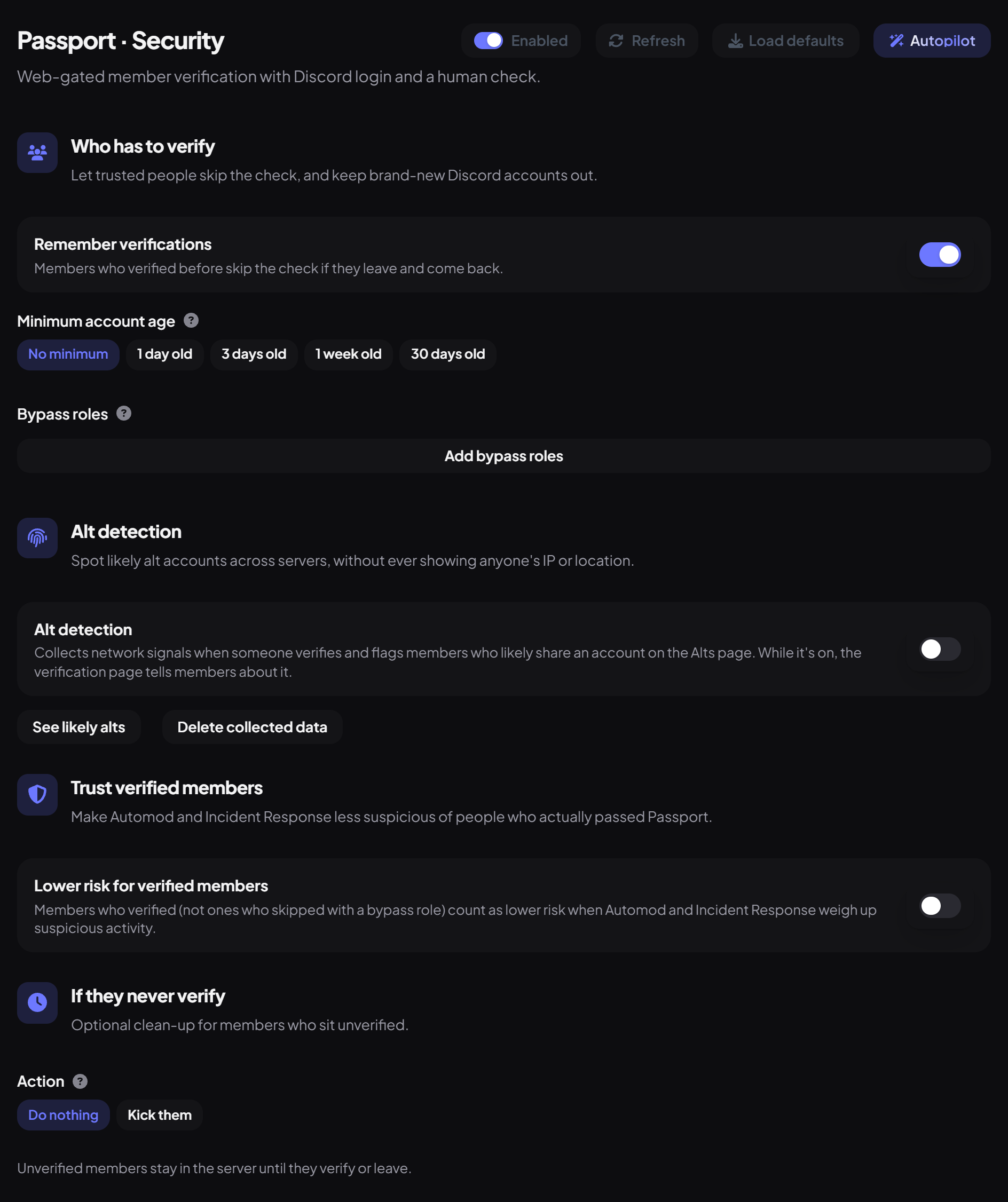
Open the Security sub-page. Under Who has to verify:
| Setting | What it does | Default |
|---|---|---|
| Remember verifications | Members who verified before skip the check if they leave and come back. | On |
| Minimum account age | Discord accounts younger than this can't verify: 1 day old, 3 days old, 1 week old or 30 days old. | No minimum |
| Bypass roles | Members with these roles are never gated (for example a role a bot gives). | None |
Step 7 · about 2 min
Add alt detection and timeouts (optional)
Spot ban evaders and clear out people who never verify.
Further down the Security sub-page:
Step 8 · about 2 min
Check the health and try it
Catch permission problems before a real member hits them.
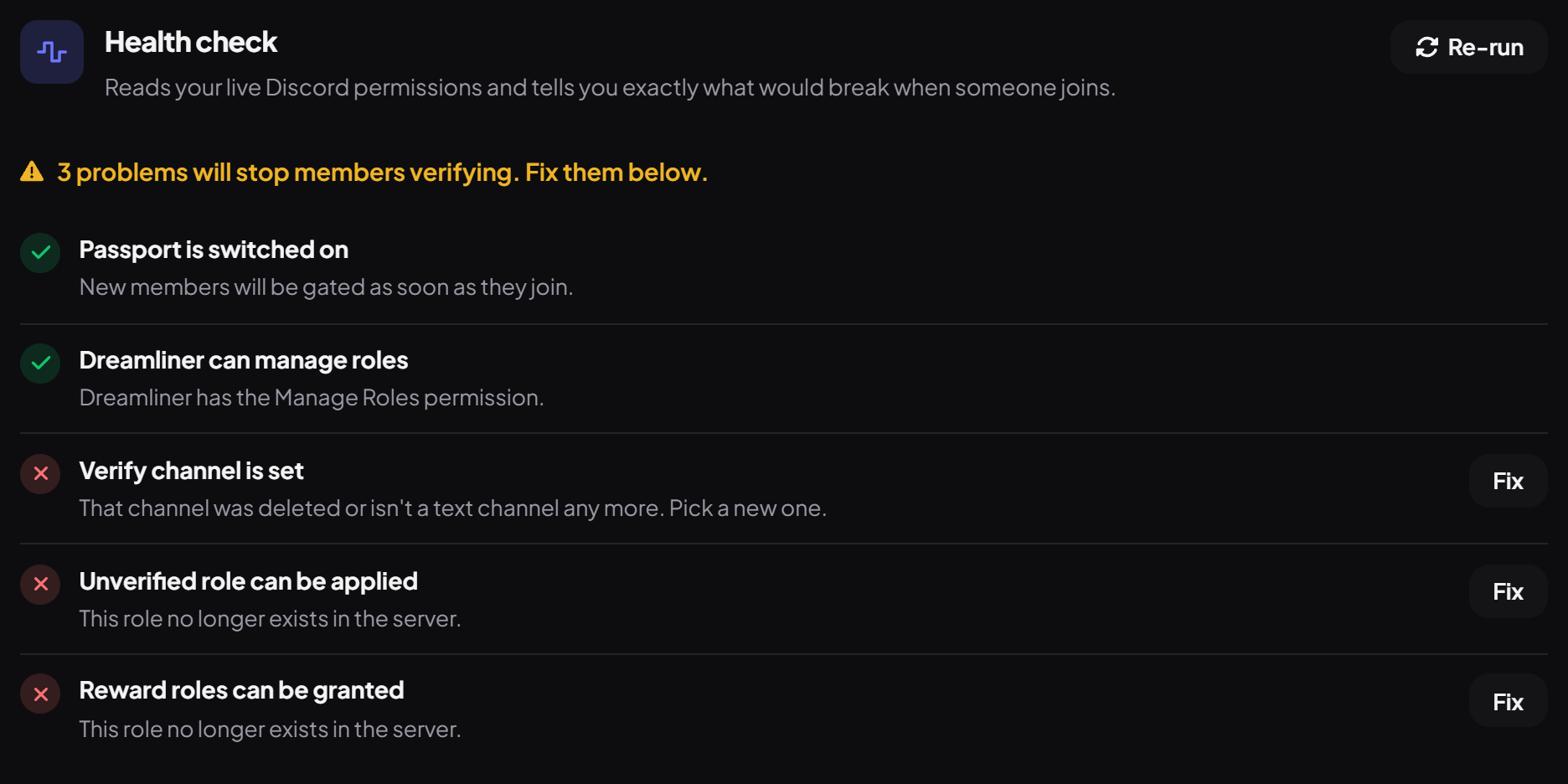
- On the Overview, the Health check runs by itself. It reads your live Discord permissions and checks Passport is on, Dreamliner can manage roles, the verify channel is set, and that the Unverified and reward roles can be applied. Press Re-run after saving changes.
- Press Fix next to anything with a cross. It takes you to the setting that fixes it.
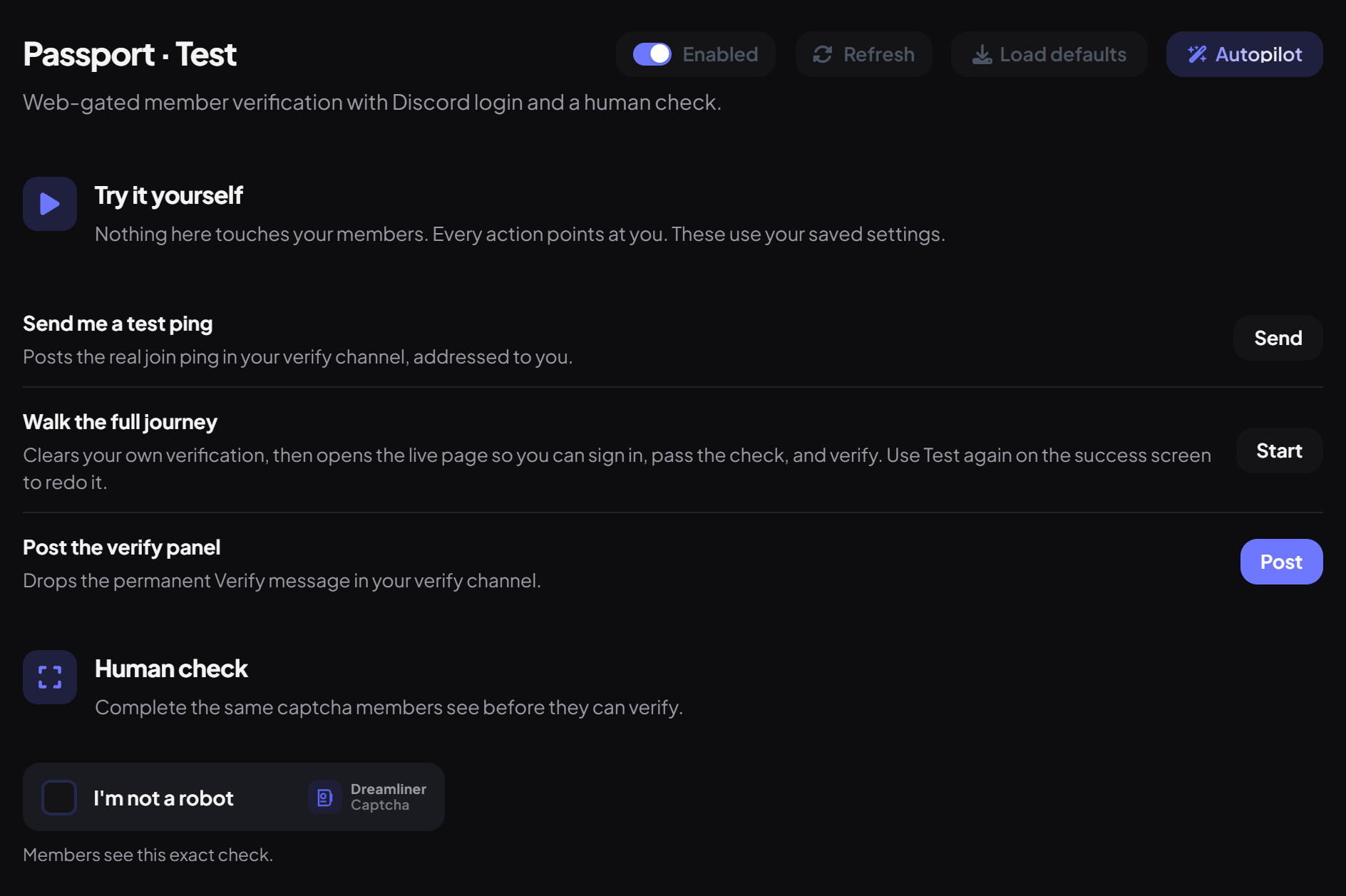
- Open the Test sub-page. Nothing there touches your members: every action points at you and uses your saved settings.
- Use Send me a test ping (Send), then Walk the full journey (Start) to clear your own verification and go through the page and captcha as a newcomer would. Post the verify panel (Post) drops the permanent Verify message in your verify channel.
- Under Human check, try the exact captcha members see.
Staff can check anyone with /passport: whether they're verified, when and how, or still pending. Moderator can use it by default.
Works with Welcomer and Invite Tracker
- Welcomer can wait until someone verifies before welcoming them, so you don't greet bots.
- Invite Tracker can count a join only once the member verifies, which keeps fake invites out of the leaderboard.
- Autorole doesn't wait for verification: it gives roles on join. Use Roles granted on verify for anything that should come after.
You're set up
What you just did
- Locked unverified members into your verify channel
- Connected Passport to your roles, wrote the ping and branded the page
- Chose who verifies, added optional protections and tested the whole journey
Pair Passport with Automod's raid protection for a strong first line of defence.
Common questions
New members can see every channel.
Deny the Unverified role View Channel on your other channels or categories. Passport doesn't change channel permissions for you.
Someone says verification failed.
If their account is newer than your minimum account age, they'll see "This Discord account is too new to verify here." They need to be in the server too.
Does it block VPNs?
No. Alt detection groups similar networks to flag possible alts, but it never blocks anyone.
Is Passport free?
Yes, completely.
Read next