
Raid Defense Mesh
Link up with servers you trust so that when one of you is raided, the others are warned straight away, with a list of the accounts involved.
By the end, you'll have
- Your server linked with partner servers you trust
- Instant alerts in your channel when a linked server is raided
Before you start
- Automod with its Raid filter on, since that's what detects a raid.
- Manage Server, so you can open the dashboard.
Raiders often hit several servers in the same community, one after another. Raid Defense Mesh lets servers that trust each other share a warning the moment one of them is raided, so the others can get ready.
You choose exactly which servers you link with.
Includes the raided server's name and up to 15 accounts that joined.
Step 1 · about 1 min
Turn it on and pick an alert channel
Get ready to receive alerts.
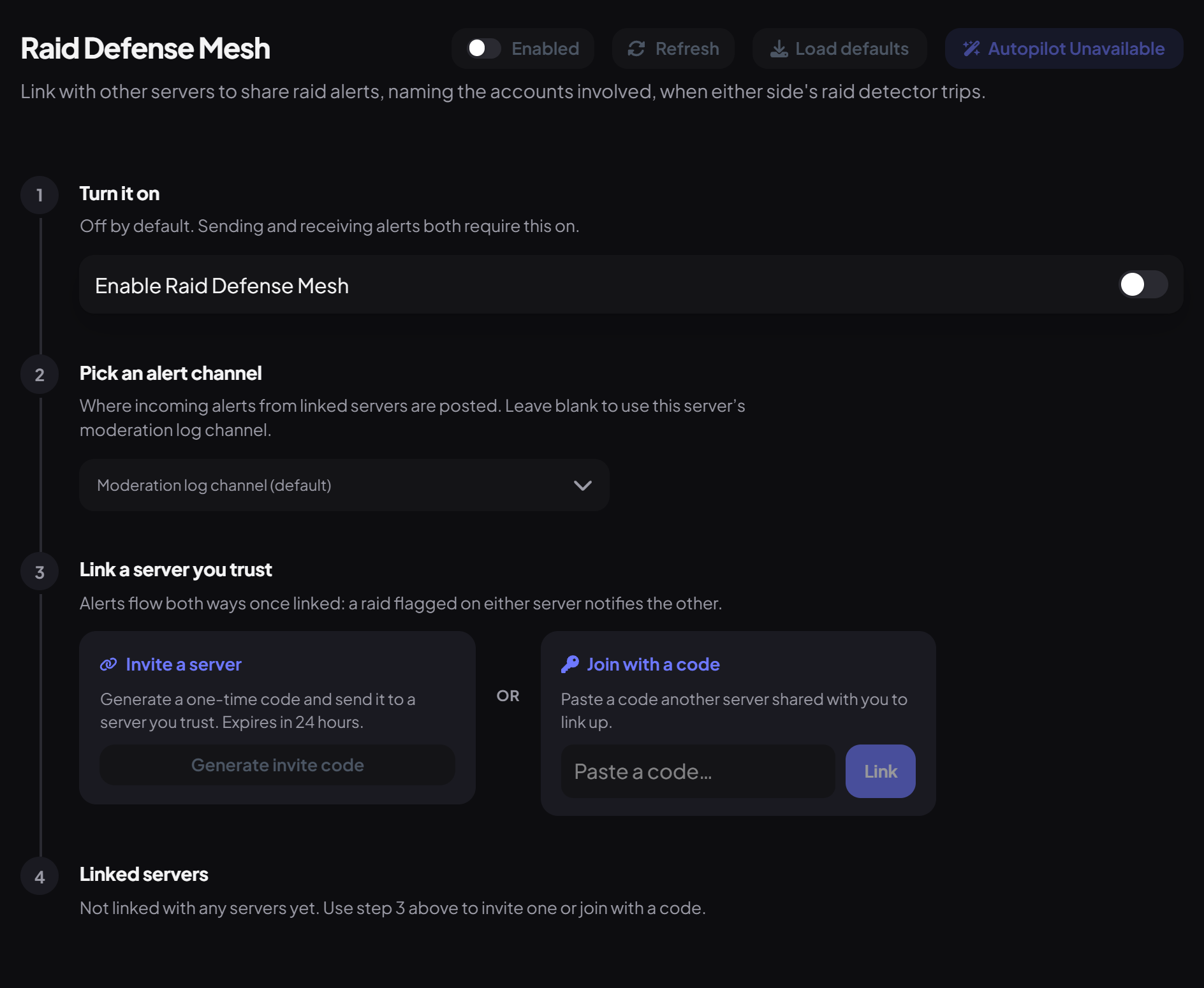
- On the dashboard, open Moderation and click Raid Defense Mesh.
- Under Turn it on, switch on Enable Raid Defense Mesh.
- Under Pick an alert channel, choose where alerts go. Leave it empty to use your moderation log channel.
Step 2 · about 2 min
Link a server you trust
Connect with a partner server.
One server creates a code and the other enters it:
- On your side, under Link a server you trust, press Generate invite code under Invite a server and copy the code. It works once, for 24 hours.
- Send it to a manager of the other server.
- On their dashboard, they paste it under Join with a code and press Link.
Both servers then appear under Linked servers, where either side can remove the link at any time.
What an alert contains
- Sent when Automod's Raid filter fires in a linked server.
- Includes that server's name and up to 15 of the accounts that joined during the raid.
- It's a warning only: no one is kicked or banned in your server automatically.
You're set up
What you just did
- Turned on Raid Defense Mesh and chose an alert channel
- Linked a partner server with a code
- Learned what alerts contain
Common questions
Are there any commands?
No, everything is on the dashboard.
My code stopped working.
Codes last 24 hours and work once. Press Generate invite code for a new one.
Read next