
Logging
Log everything that happens in your server, from joins, edits and deletes to bans and role changes, to the channels you choose, with every event switchable on or off.
By the end, you'll have
- A server log channel and a moderation log channel
- Exactly the events you care about switched on
- Busy events sent to their own channels
Before you start
- One or two log channels, ideally private to staff.
- Dreamliner with View Channel and Send Messages there, and View Audit Log to show who did what.
- Manage Server, so you can open the dashboard.
Logging keeps a record of what happens in your server, so your team can see who deleted a message, who changed a role, or who banned whom. More than 100 kinds of event can be logged, and every one is on by default.
Server events and moderation events.
Turn events on or off one by one or in groups.
Send any event to its own channel.
Step 1 · about 2 min
Pick your log channels
Choose where logs go.
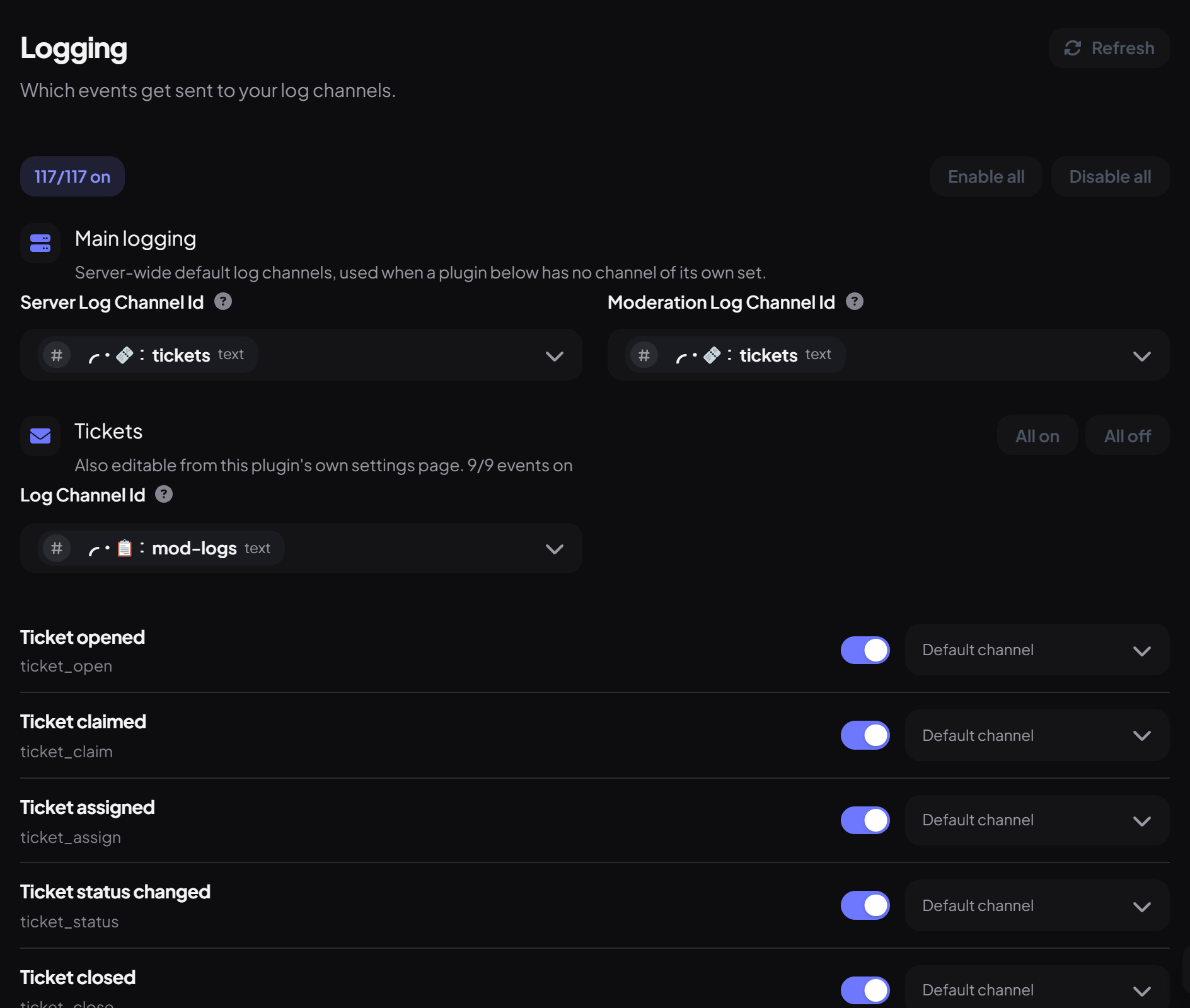
- On the dashboard, open Utilities and click Logging.
- Under Main logging, set the Server Log Channel (joins, leaves, edits, deletes, voice, role and nickname changes).
- Set the Moderation Log Channel (infractions, Automod, /clean, voice moderation and case updates).
- Press Save.
Step 2 · about 3 min
Choose which events to log
Keep the noise down.
Events are grouped by plugin (Tickets, Automod, Appeals and more) and by type (Members, Messages, Channels, Roles, Voice…). Use the toggles to turn single events on or off, All on / All off for a group, or Enable all / Disable all at the top.
| Group | Includes |
|---|---|
| Members | Joins, leaves, kicks, bans, timeouts, nickname and role changes |
| Messages | Edits, deletes, bulk deletes and pins |
| Channels, threads, roles, server | Created, updated and deleted |
| Voice | Join, leave, move, mutes, streaming and video |
| Moderation | Every case type, Automod, raids, /clean and more |
| Dashboard | Changes made on the dashboard |
Step 3 · about 2 min
Send events to their own channels (optional)
Split busy logs out.
Each event has a channel picker. Choose a channel to send just that event there, like message deletes to #deleted-messages.
Where a log goes, in order:
- The event's own channel, if you picked one.
- For moderation events from Automod, Tickets, Impersonation, Incident Response and Raid Mesh: that plugin's own log channel.
- Otherwise the Moderation Log Channel or Server Log Channel.
You're set up
What you just did
- Set your server and moderation log channels
- Chose which events are logged
- Routed busy events to their own channels
Every event is also kept for 90 days in Logs, even without a log channel.
Common questions
Logs say "Unknown" for who did it.
Dreamliner needs View Audit Log to find out who made a change.
Bots' messages aren't logged.
That's by design: bots are left out of member and message logs to keep them readable.
Read next