
Text-to-speech
Give members without a microphone a voice: messages typed in your no-mic channel are read aloud in the voice channel they're sitting in, with dozens of natural voices to choose from.
By the end, you'll have
- A no-mic channel whose messages are spoken in voice
- Members choosing their own voice
- Limits, a blacklist and moderator controls to keep it pleasant
Before you start
- A text channel to use as the no-mic channel.
- Dreamliner with Connect and Speak in your voice channels.
- Manage Server, so you can open the dashboard.
Not everyone can talk out loud: no microphone, a shared room, or they just prefer typing. With Text-to-speech, they type in one channel and Dreamliner speaks it in the voice channel they're in, so they can join the conversation. It's free.
Messages in the no-mic channel are read out in your voice channel.
Members pick from many natural-sounding voices.
Length limits, cooldowns, skip and a blacklist.
Step 1 · about 2 min
Choose the no-mic channel
Pick where members type.
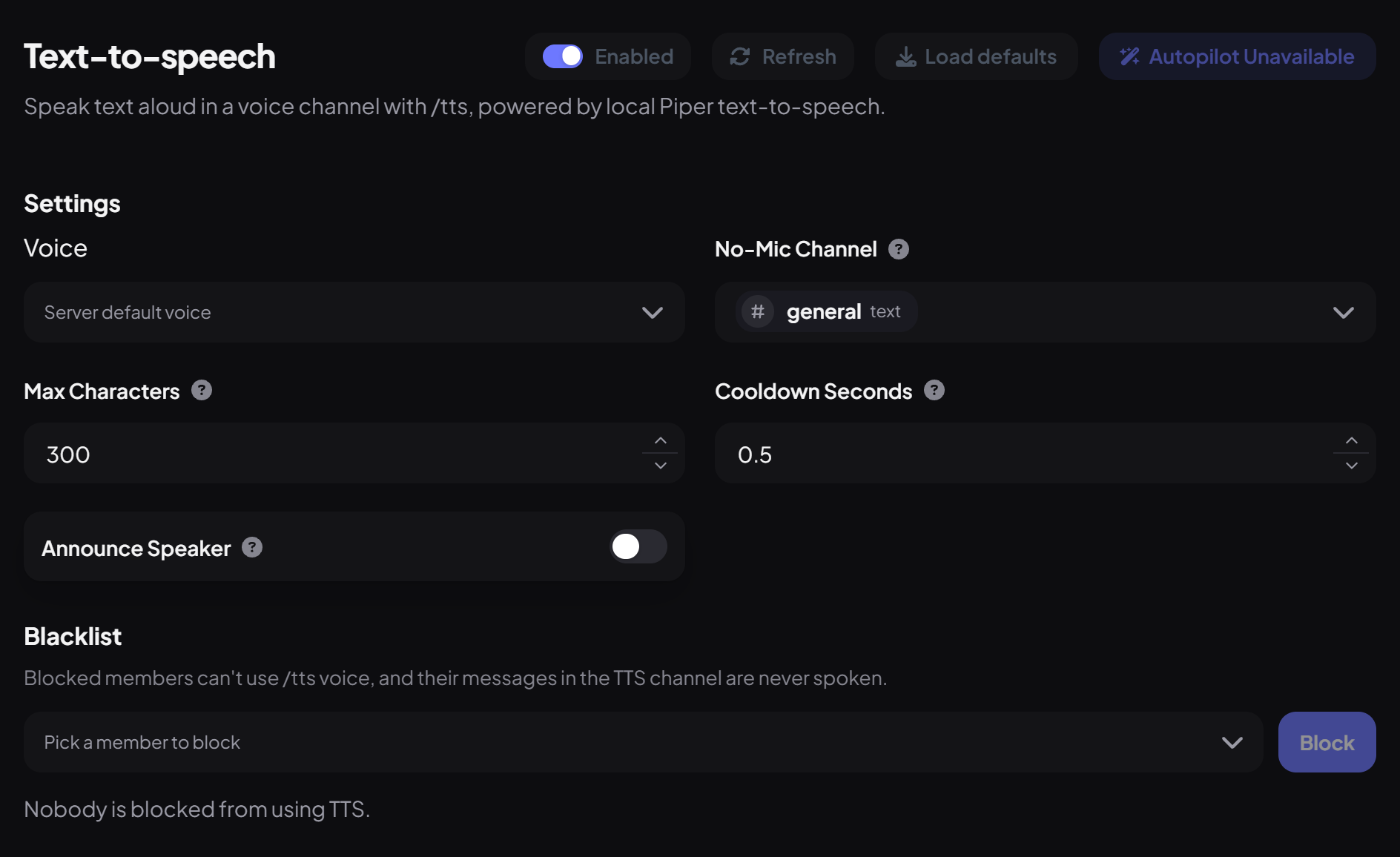
- On the dashboard, open Engagement and click Text-to-speech. Switch on Enabled.
- Set the No-Mic Channel and, optionally, the server's Voice.
- Press Save. Dreamliner adds a link to the voice picker in the channel's topic.
- Join a voice channel, then type in the no-mic channel. Dreamliner joins and reads it out.
Step 2 · about 1 min
Tune the settings
Keep messages short and sweet.
| Setting | What it does | Default |
|---|---|---|
| Max Characters | Longer messages are cut short (20 to 4,000). | 300 |
| Cooldown Seconds | Messages sent faster than this aren't spoken. | 0.5 |
| Announce Speaker | Says "<name> said:" before each message. | Off |
Step 3 · about 1 min
Pick your own voice
Let members sound like themselves.
Each member can choose a voice with /tts voice in Discord, or on the website under Account → Voice, where they can preview voices first. A member's voice follows them to every server.
What gets read out
- Only messages from members who are currently in a voice channel, in that voice channel.
- Links, file names, mentions, @everyone and emoji are left out.
- Messages from bots, server-muted members, or members who can't speak in their channel are skipped.
- Up to 25 messages wait in line; older ones are dropped if it gets busier than that.
- Dreamliner leaves after 10 minutes with nothing to say.
- Music, Clipping and Text-to-speech share Dreamliner's voice connection. If one is in use, the others wait.
Moderator controls
| Command | What it does | Who by default |
|---|---|---|
/tts voice | Choose your voice. | Everyone |
/tts skip | Skip what's being read. | Moderator |
/tts channel set · clear | Change or clear the no-mic channel. | Moderator |
/tts blacklist add · remove · list | Stop someone using TTS. | Moderator |
You can also block members on the dashboard under Blacklist. Blocked members' messages are never spoken.
You're set up
What you just did
- Set the no-mic channel
- Tuned length and cooldown
- Showed members how to pick a voice
Pair it with Companion channels so every room has a voice.
Common questions
My message got a ❌ reaction.
Dreamliner couldn't join your voice channel, usually because it's busy in another channel or lacks Connect or Speak there.
Is there a /tts say command?
No, just type in the no-mic channel while you're in voice.
Read next