
Translation
Translate any message into your server's language with /translate, and with Dreamliner One, let Dreamliner flag messages in other languages so anyone can tap a flag for a translation.
By the end, you'll have
- Your server's default language set, so translations land in the right one
- Members translating messages or their own text with /translate
- Optional automatic flags on messages written in other languages (Dreamliner One)
Before you start
- Manage Server, so you can open the dashboard.
- For auto translate: Dreamliner One on this server.
International communities often have people chatting in several languages at once. Translation helps everyone follow along, using Google Translate behind the scenes. /translate is free; automatic flags need Dreamliner One.
Translate a message (by ID or link) or any text you type.
From English and Spanish to Filipino and Swahili.
Dreamliner One: tap a flag under a message to translate it.
Step 1 · about 1 min
Set your server's language
Tell Dreamliner which language to translate into.
- On the dashboard, open the Server page.
- Under Language, choose the Default language. It's English unless you change it.
- Press Save.
This is the language /translate uses when nobody picks one, and the one auto translate translates into.
Step 2 · about 2 min
Translate with /translate
Translate a message or some text.
| Option | What to put |
|---|---|
| text | Text to translate, up to 2,000 characters. |
| message_id | A message ID from this channel, or a message link from anywhere in the server. |
| language | Optional. Start typing a language name, code or flag. Leave it empty for your server's language. |
Use either text or message_id, not both. The reply shows the translation with the languages, who wrote the original, and an Original button to jump to it. Only the message's text is translated, not embeds.
Step 3 · about 2 min
Turn on auto translate (Dreamliner One)
Flag messages in other languages automatically.
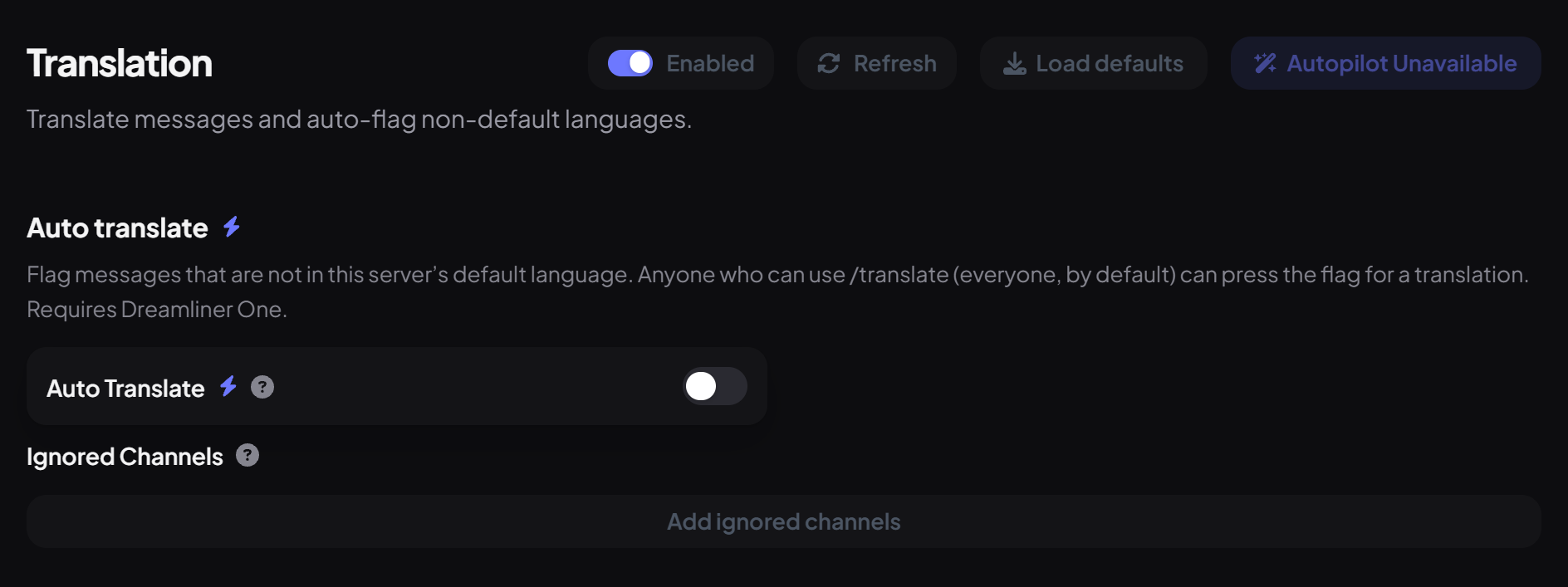
- Open Engagement → Translation and switch on Enabled.
- Under Auto translate, switch on Auto translate. Without Dreamliner One you'll see a button to get it instead.
- Add channels to Ignored channels where flags would be noise. Threads inside an ignored channel are ignored too.
- Press Save.
How it works for members:
- When someone writes in a language other than your server's, Dreamliner reacts with your server language's flag (for example 🇬🇧).
- Anyone who can use /translate taps that flag, and Dreamliner posts the translation right under it.
- With Manage Webhooks, the translation appears with the original author's name and picture. Otherwise Dreamliner replies itself.
- Each message is translated at most once a minute, however many people tap the flag.
You're set up
What you just did
- Set your server's default language
- Learned /translate
- Optionally turned on auto translate flags
Running a Dreamliner One server? See everything else it unlocks on the Dreamliner One page.
Common questions
It says "Translation failed".
The translation service may be busy, or the language code wasn't recognised. Pick the language from the list and try again.
Is there a right-click Translate option?
Not at the moment. Use /translate with the message link, or turn on auto translate.
Does it use AI?
No, translations come from Google Translate.
Read next